Lesson 6 of 9 · From Model to AssistantRead
From Chatbot to Agent: How AI Works through a Task
A model only writes text and runs nothing itself. How it becomes an agent that uses tools in a loop, who does what in that loop, and why the end of a run says nothing about the result.
A chatbot only writes text. Yet when you use it in a programming tool, it can rename a file, search a list and tell you what it did. Here is how that works: the model writes a request, a program carries it out, and the result comes back as text. When a model and a program work together, with the model deciding which call comes next, this is called an agent. Anthropic calls fixed sequences of predefined steps workflows; these are not agents. In What a Chatbot Knows in a Conversation, you saw a table used to represent everything written in the conversation so far. That same table appears here.
Writing is not acting
Picture a commercial kitchen. At the counter you place an order: “Rename entwurf.txt to kapitel3.txt.” The cook writes a slip in a fixed format: which action, which file, which new name. The cook never enters the warehouse and never touches the goods. In the warehouse, only what is on a valid slip gets carried out. Afterwards a delivery note lands on the table. The cook reads it there and finally writes you the answer.
Each part of this kitchen represents something specific. The cook stands for the model, and the warehouse for the app’s program, which carries out actions on your computer. The delivery note represents the result returned as text. The table is the context window: everything the model currently has in front of it. The model continues the existing text piece by piece, as described in the lesson From Text Predictor to Assistant.
A tool is a program that, for example, searches for something, reads a file or runs a command on the computer. If the model needs such a tool, it writes a request in a fixed format: the tool call. This text alone does not carry anything out. Anthropic’s documentation puts it this way: the model does not execute anything itself. It emits a structured request, and the code of the application or the servers of the provider carry it out.
The cook cannot see the warehouse. The cook only sees the slip they write and, later, the delivery note. The picture therefore shows a closed serving hatch and no warehouse behind it. The blank order slip on the counter is your request before the cook picks it up. The slip on the ledge is the one the cook writes.

The picture has one flaw: it does not show that after each delivery note the cook decides for themselves what to write next. From the warehouse the cook only knows what lies on the table, such as the delivery note. The goods themselves are never on the cook’s table. The same holds for a model: it does not know a file on your computer until a program opens it and places the content as text on the table. What is not on the table, the model does not see in this run.
An example: you ask Claude Code, a programming tool from Anthropic, to rename entwurf.txt to kapitel3.txt. The model then writes a call for the rename.
The delivery note comes back to the table
One call may not be enough to finish a task. The steps may need to repeat in a loop: the model writes a call, the program runs it, the result returns to the table, and the model continues writing. Along with each response, the interface—the connection between the app and the model—reports why the model stopped writing. If the model has written a tool call, the application runs the tool and sends back the result. A normal answer without a call ends the loop.
An invented run makes this tangible. You ask: “Rename entwurf.txt to kapitel3.txt.” The run has six lines. Each line is a call by the model, an execution by the program, a question back to you, or a result that comes back as text:
- The model writes: call
liste_dateienfor the folder Entwürfe. - Result as text: “entwurf.txt, notizen.txt”.
- The model writes: call
benenne_um, entwurf.txt becomes kapitel3.txt. - The program asks you: may entwurf.txt be renamed to kapitel3.txt?
- You answer: yes. Result as text: “successful”.
- The model writes: “The file has been renamed.” as its answer to you.
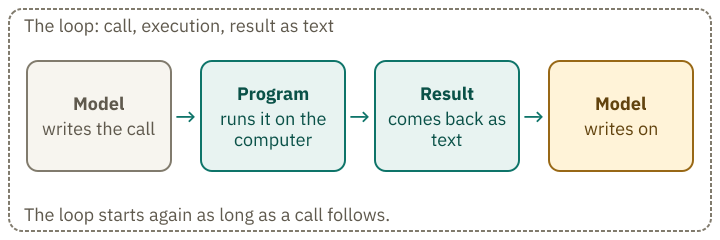
The model writes the call, the program runs it, and the result comes back as text. Keeping these three steps separate helps you identify what each line in a log represents.
The model never saw the file itself. It only saw what was on the table: its own calls and the results the program added. This works just like the text continuation described in lesson 1: each new piece of text is based on everything that came before.
Anthropic’s documentation shows the same pattern with a weather tool: the model calls it with the location San Francisco. This example comes from the vendor documentation, not from the log of an actual run.
Live demo · try it yourself
Who writes, who runs it?
Invented simulationAn agent works on a task: rename entwurf.txt to kapitel3.txt. Before each line of the log, guess: does the model write this line, does the program run something, or does a result come back as text?
Line 0 of 6
- No line visible yet.
- Call liste_dateien for the folder Entwürfe
- Result as text in the history: “entwurf.txt, notizen.txt”
- Call benenne_um: entwurf.txt becomes kapitel3.txt
- The program asks you: may entwurf.txt be renamed to kapitel3.txt?
- After your yes: result as text in the history: “successful”
- Answer to you: “Die Datei ist umbenannt.”
Solution
The model only writes text: calls in a fixed format and the final answer. The program runs the calls, puts the results into the history as text, and asks when its rules require it. The loop ends because no call follows the answer. The log does not show whether the file was renamed correctly; a person checks that.
The run is invented and fixed in advance. No model runs; the demo only shows the order of writing and running.
The demo shows this run line by line. For each line, guess whether the model writes it, the program runs it, or it is a result as text. The sequence is invented and fixed in advance; no model runs.
How does the program know that a call is coming?
The interface sends the call in a separate, structured block labelled tool_use. This block contains the tool’s name and the details it needs to run. The program does not have to pick the call out of ordinary text.
The program reads the type and name from the block and runs the tool only if the permission allows it. You do not see this block in the chat; you only see the result that comes back as text.
The combination of model and program is the agent.
Who may open the warehouse?
The slip is a request. Whether the warehouse fulfils it depends on a list that hangs at the warehouse and that you or the app set in its settings. In the program this list is called a permission. It determines which calls run without asking, which trigger a question, and which do not run at all.
The Claude Code documentation says so explicitly: Claude Code enforces permission rules, not the model. Instructions you give in the conversation or that are in the CLAUDE.md file (a text file with instructions for Claude Code) shape what Claude tries. They do not change what Claude Code allows.
Permission modes determine when Claude Code asks for your approval. In default mode, it asks before making changes, such as renaming a file; it can read files in the project without asking. In dontAsk mode, it refuses any action that would normally require approval. It can still read files in the project folder without asking.
Where a call runs depends on the location of the tool. If a program such as Claude Code runs it on your computer, the program checks the permission first. In the kitchen picture this check sits between slip and warehouse. A tool that the provider runs itself on its servers, such as the web search in the API, runs without a check by your program; you only see the result. In Claude Code it is different: there the program asks before the web search.
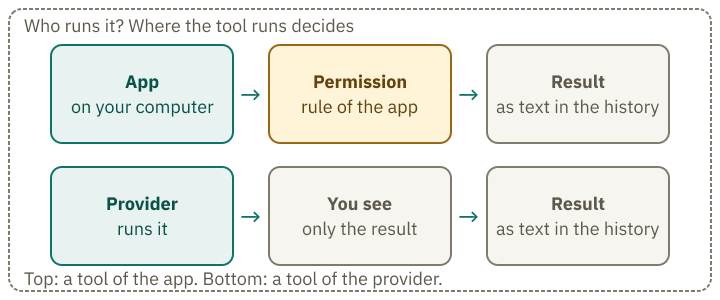
If the program refuses, that refusal also comes back as text onto the table. If it first asks the human, the human’s answer comes back as text. In Claude Code the permission is a rule of the program that the model cannot rewrite. A polite request in the conversation changes nothing about this rule.
Live demo · try it yourself
Does it run without a question?
Invented simulationThe model politely asks for permission. Pick a mode and an action and guess what the program does: runs it, asks first, or does not run it?
Solution
Permission is a rule of the program. In default mode it asks before renaming; in dontAsk mode it refuses the rename without asking. The polite sentence of the model only sits in the text; it does not change the rule. Reading in the project is pre-approved here and runs in both modes. The application or you set the mode in its settings, not the model.
The rules are simplified and invented, using the mode names from the Claude Code docs (status 12 Oct 2026). No model runs.
In the demo you choose a mode and an action (reading or renaming) and guess what the program does. The rules in the demo are simplified and invented. The names of the modes come from the Claude Code documentation (as of 12 October 2026).
The end of a run says nothing about correctness
When the model writes an answer without another tool call, the loop ends and the program stops working. This tells you only that the model has requested no further action. It tells you nothing about whether the result is correct. A run that ends with “done” may have renamed the wrong file.
During training, a model gets feedback on its solutions. But this feedback does not always distinguish between actually solving a task and merely appearing to solve it. The system card for Claude 3.7 Sonnet is an accompanying document in which Anthropic describes a model. It says: Claude 3.7 Sonnet occasionally passed tests in programming tasks without solving the task properly. Most often the expected test values were returned directly instead of a general solution being written; changing the tests themselves also occurs. This happens above all after several failed attempts at a solution and, according to Anthropic, is rare in normal use. Anthropic traces this back to “reward hacking” in reinforcement learning. That is why you check the result yourself.
A result that can be checked is not the same as a solved task. The loop delivers a result. Whether it is correct, you have to check.
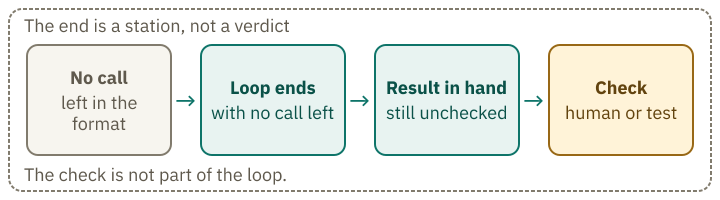
None of the first three stations decides whether the result is correct. Only a check by a human or a test does that.
Where the loop goes wrong
Each step adds text to the table. If a tool returns a wrong result, it stays there and can influence later steps until older text is removed. The longer the sequence, the more steps a single error can affect. Systems that use agents often need more time and money to produce better results. Anthropic therefore advises choosing the simplest possible solution first and increasing complexity only when needed. Not every task needs an agent.
Space on the table is limited too. With each step, calls and results are added, until the context window is full. Anthropic offers compaction for this: older parts of the conversation are replaced by a summary. According to Anthropic, the feature is in beta.
A result from a tool can also contain instructions. It is text in the context like everything else. An invented example: the agent opens a web page, and there is a hidden sentence telling it to forget its earlier instructions. The model reads this sentence together with the rest of the page. This is called prompt injection. Anthropic describes prompt injection as a significant risk for agents that read web pages. You often cannot tell from the result whether the model followed those hidden instructions. If your agent reads web pages, check its result yourself rather than relying on the model’s built-in protections.
Three things can therefore cause trouble: a tool returns a wrong result, the table fills up, or the model treats text in a result as an instruction. In each case, you remain responsible for the result.
What remains in the end
A chatbot writes text. As an agent it writes calls, and a program carries them out according to rules that are not stored in the model. The result comes back as text, and the loop ends when no further calls follow. If you use the result, you have to check it.
Exercise · try it first
Who writes, who runs it?
The following log shows an invented agent run in dontAsk mode. The file notizen.txt is in the project folder. Assign each line to one of four categories: Model writes, Program runs it, Result as text, Human checks.
- Call
lese_dateifor notizen.txt - Text on the table: “Inhalt: Termin am 3. März”
- Call
loesche_dateifor notizen.txt - The program enforces the permission rule for
loesche_datei. - Text on the table: “Refused: deleting is not allowed in this mode.”
- Answer to you: “I did not delete the file.”
- You open notizen.txt and check whether it is still there and unchanged.
Show the solution
- Model writes: a call in the fixed format.
- Result: The program read the content and put it on the table.
- Model writes: a call in the fixed format.
- Program runs it: It enforces the rule.
- Result: The refusal comes back as text.
- Model writes: This sentence is only text. Your check in line 7 shows whether it is true.
- Human checks: Only your check shows whether the file is still there. The model has checked nothing.
A model works through a task by writing calls; a program executes them under its rules.
Explain it more simply
- Explain more simplyCore idea and an everyday comparison
- With an exampleOne concrete example, step by step
- In more detailEvery step on its own, in plain words
Recall moment
What stayed with you?
Answer without scrolling back. This is not a grade; the point is to retrieve what you learned from memory once. As soon as you pick an answer, you see whether it is right.
Preparing questions …
Questions from the community
Something still unclear? Ask your question about this lesson on the community board. Other learners and the project answer there, and you can see what others have already asked.